

AI triage and Kicker
Most security events on a Linux host are routine. Most alerts, on inspection, turn out to be explainable. The AI layer exists to do that inspection before a phone rings: classify what is benign, escalate what is not, and leave a written reason either way. Fail-open is the rule throughout - if the model is unavailable or quota is spent, alerts still fire exactly as they would without AI.
Two layers share the work. Tiered triage runs on individual security events as they arrive. Kicker, the SRE agent, works at the alert level: it triages open alerts, opens and closes incidents, and drafts after-action reports.
Raw kernel events are classified by AI - routine operations are explained and stored, real threats are escalated with MITRE ATT&CK context
Security event verdicts
Section titled “Security event verdicts”Every event above the analysis threshold is classified and stamped with an AI Verdict, a severity, a confidence, and a plain-English summary. The verdict appears as a column in the event stream, as a filter, and on the event’s AI Analysis tab:
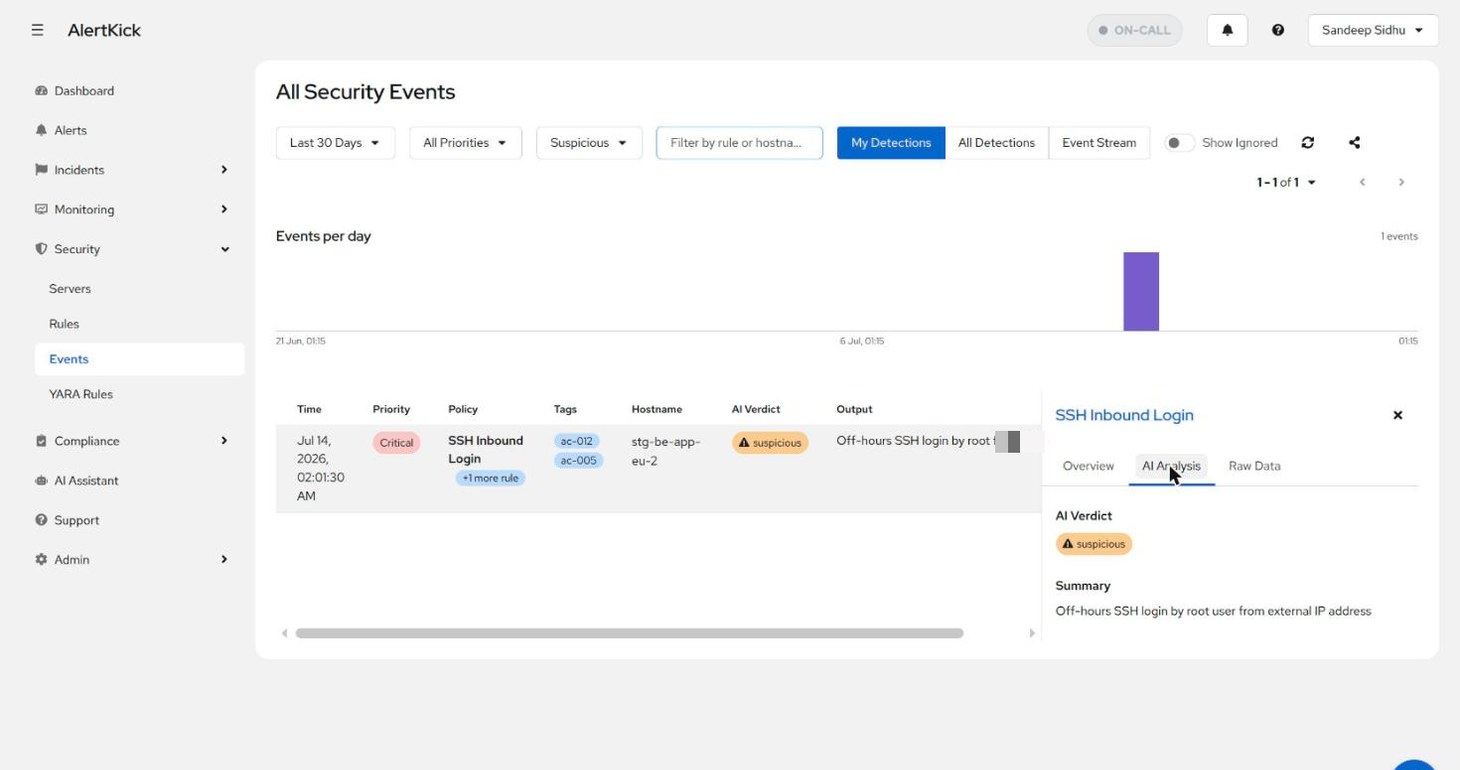
Verdict labels are malicious, suspicious, policy_violation,
benign, false_positive, noise, and unknown. Reading, filtering,
and overriding verdicts is covered in
Security events; this page explains
how the verdict is reached.
The tiered path
Section titled “The tiered path”Analysis runs on the ingest path in order of cost. Each tier either finishes the event with a recorded reason or hands it on:
| Tier | What happens | Cost |
|---|---|---|
| T0 | Noise filter and ignore rules | None |
| T1 | Standing directives - a suppressed event is stamped skipped with “Suppressed by SRE agent directive” | None |
| T2 | Baseline check - an event that matches the host’s learned rhythm is stamped skipped_baseline with a human explanation; 1% of skips are audited by T3 to guard against baseline poisoning | None |
| T3 | Cheap triage on the chat model with the host memory card; verdict benign (stamped triaged), suspicious, or unknown | One small call |
| T4 | Deep analysis on the security model with the top 3 similar past alerts; full verdict, severity, MITRE mapping | One larger call |
T3 is instructed: when in doubt, unknown - which escalates to deep
analysis, the safe direction - and never to mark an event benign
solely because it is frequent or low priority.
Which events enter the path is set by Admin -> LLM Settings ->
minimum priority for analysis. The default is Warning, so
critical, high, and error events are analysed automatically
while medium and low are not; those carry the bulk of event volume
and can be analysed on demand with the Request Analysis button on
an event stamped skipped.
Every skip and every verdict is written to the activity ledger (Admin -> LLM Settings -> Agents), so “why was I not alerted about this?” always has an answer. Nothing is dropped silently.
What the model sees
Section titled “What the model sees”Baselines are built by aggregation over 30 days of a host’s events - per-rule hourly and weekday histograms, user counts, coarse source buckets (never raw IPs), and rules that fire elsewhere in the fleet but never here - with a learning confidence that ramps over roughly two weeks. No model is involved in building them.
The host memory card combines your standing directives, the baseline rhythm, a rolling digest, and recent episodes into a single block that is injected into every triage and analysis prompt. It is rendered per host in the UI so you can see exactly what the agent knows, and your corrections outrank everything else in it.
Kicker: alert triage
Section titled “Kicker: alert triage”Kicker is available on the Business plan and is enabled per tenant
under Admin -> LLM Settings -> Agents, with separate toggles for alert
auto-triage, incident automation, and live host diagnostics. It acts
under the username sre-agent and signs its work “Kicker (SRE
agent)”.
With auto-triage on, a sweep runs every 15 seconds over alerts less than 30 minutes old (at most three per sweep, 30 per hour per tenant):
- Claim and acknowledge. Kicker takes a three-minute lease on the alert and acknowledges it, which pauses the escalation chain.
- Gather evidence. The alert source and whether the host is in the fleet; linked security events and their source IPs; known-IP evidence from SSH allowlists; the business-hours check; for monitor alerts, the service and hosts behind the URL; recent host changes and container state; similar past alerts; the host memory card; and, where the tenant and host have both opted in, a live diagnostics run on the host.
- One model call returns a verdict with a reason.
- Apply.
benignresolves the alert with the reason as its resolution note.suspiciousorunknownrestores the escalation chain immediately and opens an incident. A model error, timeout, or quota refusal also restores escalation - the acknowledgement never outlives a missing verdict.
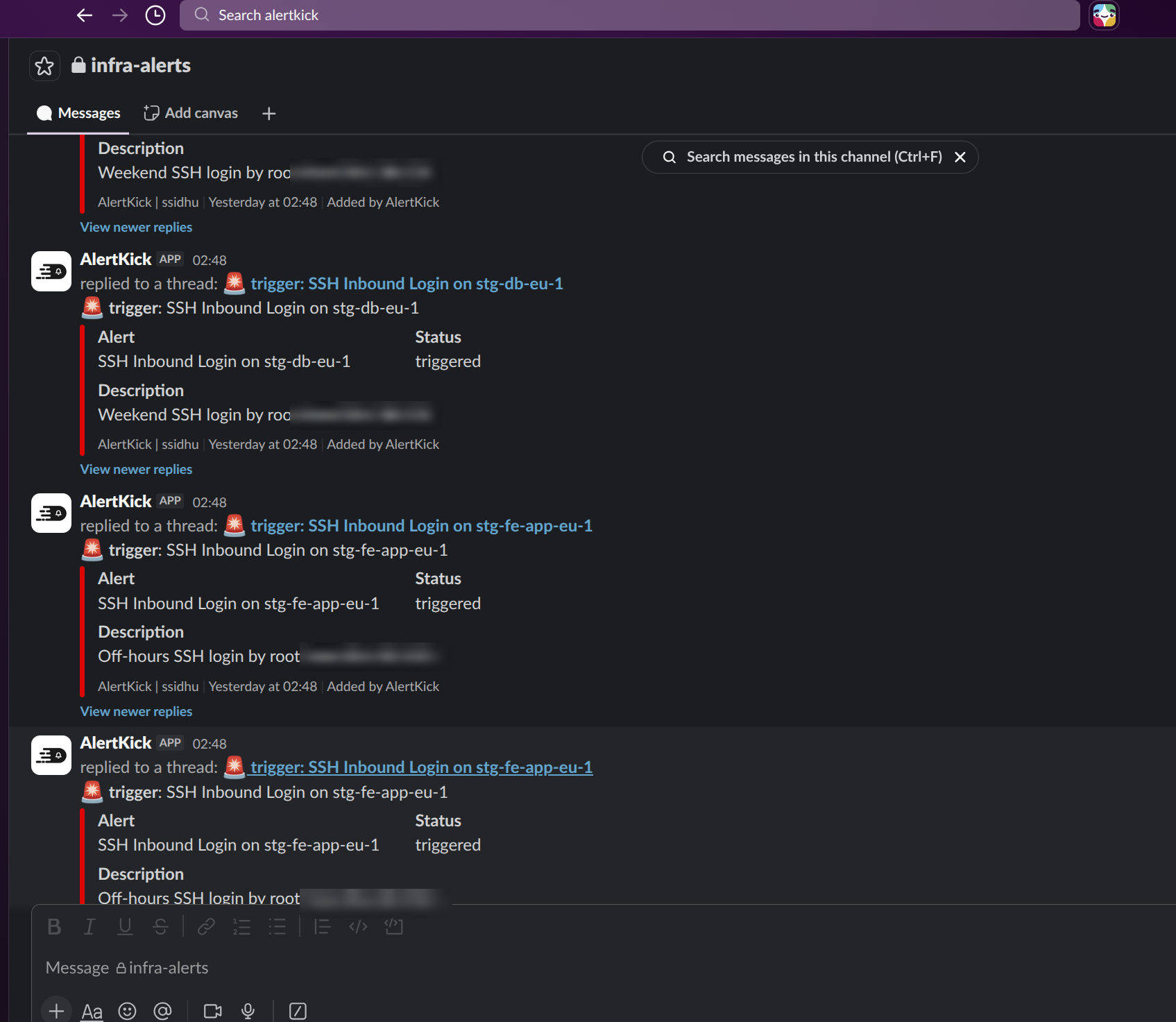
The outcome is posted as a thread reply under the alert’s Slack message (“Triaged by Kicker - benign (no action taken)” or ”… escalating”) and recorded on the alert’s timeline.
Incidents
Section titled “Incidents”Incident creation is deterministic; no model decides it. Kicker opens
an incident when an alert is acknowledged at or above the tenant’s
severity floor (default high), and always on an escalate verdict.
Repeat alerts for the same open incident attach to it rather than
creating another. Critical alerts become P1, everything else
P2; P0 is never assigned automatically.
If an alert Kicker opened an incident for later turns out benign, the incident is resolved with the benign explanation as its summary - unless a person has already taken it into investigation, in which case it is left alone.
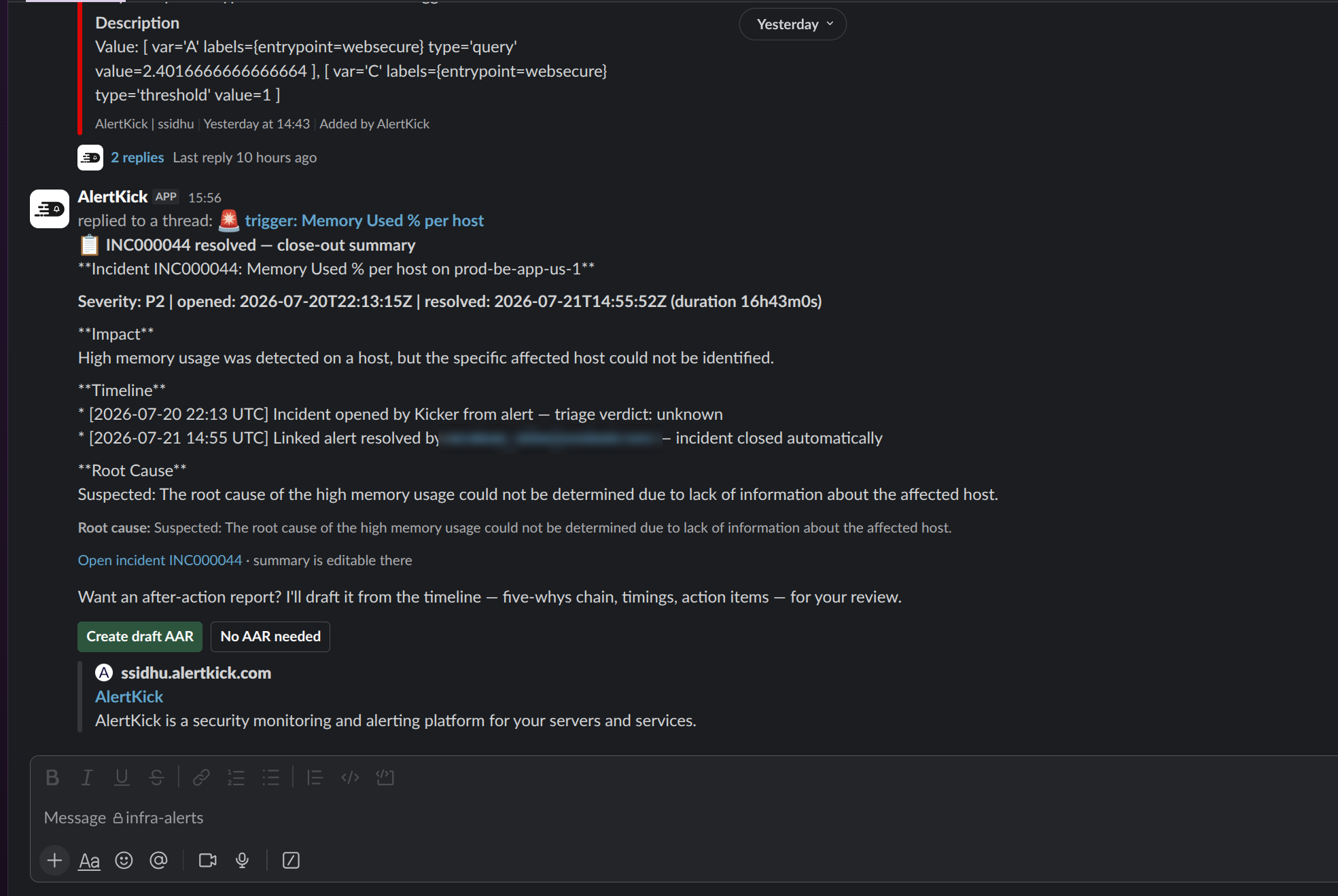
When an incident resolves, Kicker drafts a close-out summary and root cause from the timeline and the linked alerts’ triage evidence, and posts it to the thread with two buttons:
After-action reports
Section titled “After-action reports”Create draft AAR generates a report from the incident record only
- the prompt is instructed never to invent timeline entries, causes, owners, or numbers, and to keep a blameless tone. It follows your tenant’s editable five-whys playbook and contains: Summary, Timeline, Five Whys, Root Cause, Impact, What Went Well, What Could Be Improved, Action Items with owner and date placeholders, and Lessons Learned. Time to detect, engage, and mitigate are computed from the incident. The report is always created as a draft for a person to edit and publish from the incident page; there is one AAR per incident.
The Slack surface
Section titled “The Slack surface”Alerts post to Slack with Acknowledge and Resolve buttons, and everything that happens afterwards - triage notes, incident updates, the close-out - threads under that message:
The /alertkick command offers alerts, incidents, ack <id>,
resolve <id>, subscribe <id>, status, use <account>, and
help. Mention the bot in a thread to ask Kicker a question about the
alert or host; it only reads a thread when mentioned and never reads
channels or DMs passively. Chat is gated by the tenant’s user-chat
setting. See Notification channels
for installing the Slack app.
Triage from your own assistant
Section titled “Triage from your own assistant”The same evidence is available to Claude or any MCP client through the AlertKick MCP server - list open alerts, read linked security events and their verdicts, check the server, acknowledge or resolve with a reason, and open or approve changes. See AI assistants and Claude and the MCP connector.
Quotas by plan
Section titled “Quotas by plan”AI analysis is metered per model call. Counts are enforced in six rolling windows; user-initiated requests (Request Analysis, chat, AAR drafting) are only ever refused by the monthly spend cap, while the count windows exist to stop runaway automation.
| Free | Professional | Business | |
|---|---|---|---|
| AI event analysis | Off | On | On |
| Kicker (SRE agent) | Off | Off | On |
| Included analysis events / month | 0 | 1000 | 5000 |
| Tenant calls: hourly / daily / weekly | - | 60 / 200 / 1000 | 120 / 400 / 2000 |
| Per-host calls: hourly / daily | - | 30 / 150 | 60 / 300 |
| Monthly spend cap (pay-as-you-go) | - | $25 | $100 |
Tenant caps set in LLM Settings can lower the plan defaults but not
raise them. When a window is exhausted, events are stamped
rate_limited, the alert timeline records that triage was skipped for
quota, and escalation proceeds normally.