on-call · escalation · paging

At 3 AM, one phone goes off. The right one.

On-call rosters, escalation policies, and paging over mobile push, SMS, WhatsApp, Telegram, Slack, and email. Point the alerts you already have at it, and AlertKick pages the person who is actually on call - climbing to the next one until somebody acknowledges. Priced per server, never per engineer.

Free plan · no card · commercial use allowed
Moving from PagerDuty or Opsgenie? Import schedules and policies with a read-only key.

escalation policy · critical_alerts armed
Alert · critical 02:14

Disk 92% on prod-web-1

L1 primary on-call no ack
L2 backup on-call acknowledged
L3 #infra-alerts not needed

acknowledged 02:20 · escalation stopped

Two people were paged in six minutes. Nobody off duty was woken, and the policy stopped the moment someone took it.

roster: daily_oncall 2 of 3 levels used

ai-native monitoring

Set up monitoring by asking for it. In Claude or ChatGPT.

Connect AlertKick once and your assistant works inside your workspace: create uptime, SSL, DNS and heartbeat monitors, read alerts and security events, acknowledge a page, open a change window. No dashboard to switch to, no keys to paste.

Listed in the Claude connector directory. 38 tools, every write marked as a write.

Claude ChatGPT Cursor any MCP client
ai assistant · alertkick tools connected

you

"Watch alertkick.com and warn me a month before the certificate expires."

Tool call write

create_domain_expiry_monitor

domain: "alertkick.com"
domain_expiry_alert_days: 30

Allow your AI assistant to create domain-expiry monitor?

Nothing happens until you allow it.

Allow Cancel
monitor: created checks daily · alerts at 30 days

already have monitoring?

Point your existing alerts at it.

You do not have to replace anything to fix on-call. Send alerts in over a webhook and AlertKick handles the rota, the paging, and the escalation from there.

your existing alerts AlertKick six ways to reach them on call Prometheus Grafana Datadog CloudWatch Zabbix Nagios Icinga2 Webhook roster + escalation policy Slack Telegram WhatsApp SMS Email Mobile push the engineer on call tonight
Whatever raises the alert, one roster and one escalation policy decide who hears about it - and on which channel.

What brings you here?

same agent · same plan · three jobs

ai-native monitoring

Connect it to Claude, or open a page in ChatGPT.

AlertKick is listed in the Claude connector directory. Connect it once and Claude works inside your workspace: create uptime, SSL, DNS and heartbeat monitors, read alerts and security events, acknowledge a page, open a change window. No API keys to paste, no dashboard to switch to.

claude.ai/settings/connectors/directory/alertkick
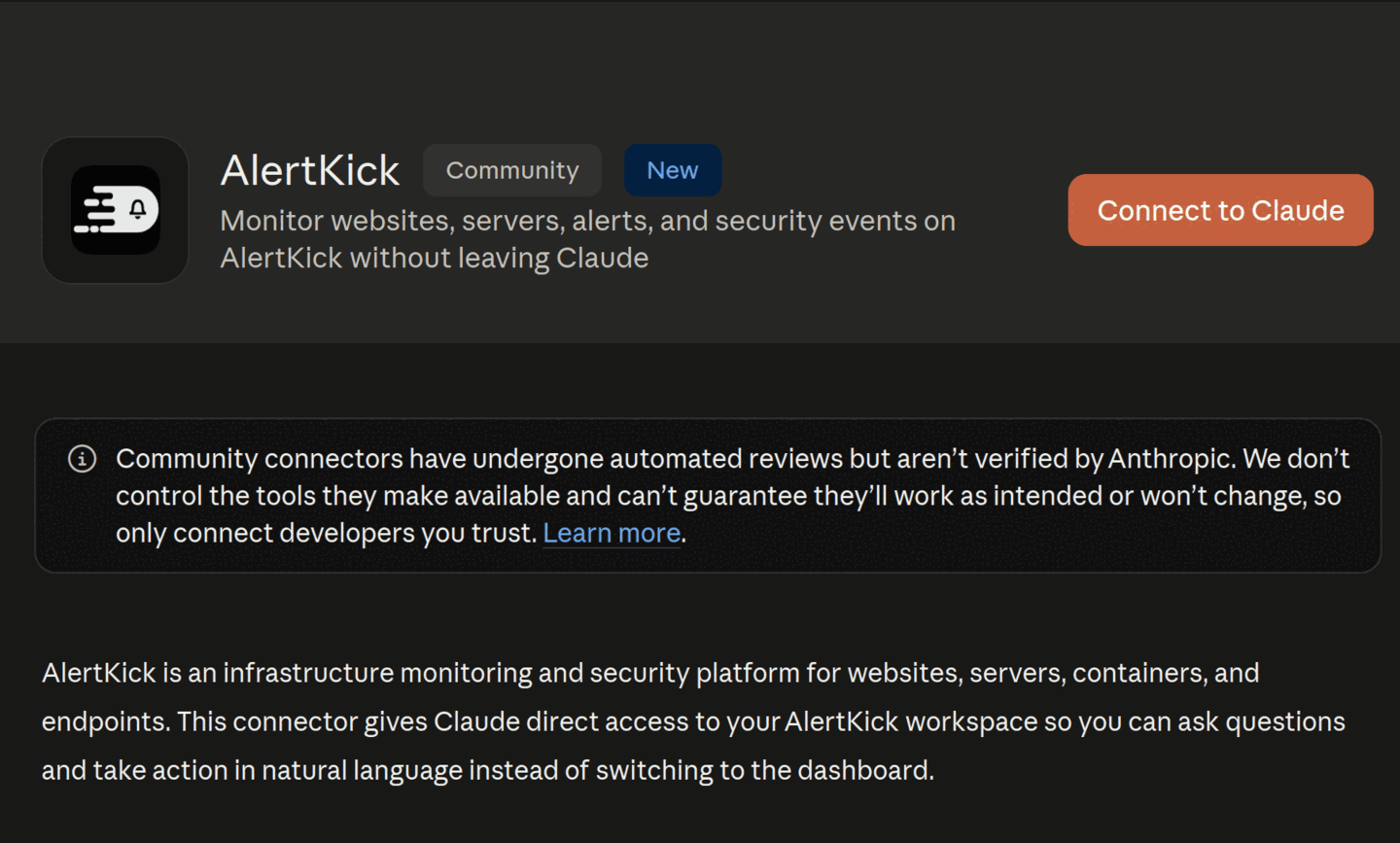
AlertKick listed in the Claude connector directory, with a Connect to Claude button and the description: monitor websites, servers, alerts, and security events on AlertKick without leaving Claude
Screenshot: the AlertKick listing in Claude.

connect

One-click OAuth to mcp.alertkick.com. The connection acts as you, in your workspace only, and you can revoke it from either side.

ask

"Monitor this URL and warn me before the certificate expires." "My backup cron runs at 02:00 - watch it." "Any open alerts? Acknowledge the staging ones."

or bring your own

Claude Code, Cursor, or any MCP client. Self-managed and on-premise installs use the open-source akmcp binary with an API key.

in chatgpt's browser

Open an AlertKick page in the ChatGPT desktop app and its tools are already there, published by the page over WebMCP. Nothing to connect, no key to paste, and your session never leaves the browser.

claude.ai/settings/connectors/directory
Searching the Claude connector directory for alertkick returns the AlertKick connector
Search the directory, choose Connect to Claude, pick your workspace.
claude.ai/settings/connectors/directory/alertkick
Part of the AlertKick tool list in Claude: acknowledge_alert, create_heartbeat, create_https_monitor, create_dns_monitor, create_domain_expiry_monitor, create_tcp_monitor, approve_change and more
38 tools, every write marked as a write.

rosters and schedules

The rota lives in the product, not a spreadsheet.

Build a rotation once - daily, weekly, bi-weekly, or a custom cadence - and it keeps turning. Everyone can see who is on call now, who is next, and when their own turn comes.

roster daily_oncall · Europe/London on call now: Rio until Fri 09:00

primary

Ada
Rio
Kai

backup

Kai
Ada
Rio

Thu-Fri backup is an override - the underlying rotation is untouched and resumes on Saturday.

Rotations that keep turning

Set the members, the order, and the handover time. Everyone takes a fair share and the schedule never needs re-typing.

Overrides for real life

Holidays, sick days, and swaps are a date range on top of the rota. The original rotation stays intact underneath.

A roster per team

Platform, database, and application on-call can each have their own rota, and escalation policies pick the one that fits the alert.

Team spread across the globe? Follow the sun, done right.

A schedule type where the rota stays simple but off-hours alerts nudge the awake shift on Slack first - the rota engineer is only woken if nobody acknowledges in time.

See how it works

escalation policies

It keeps climbing until someone answers.

A policy is a list of levels. Each one names who to reach, on which channel, and how long to wait before giving up on them. Acknowledge at any level and the whole thing stops.

  • A different channel per level - Slack for a warning, SMS and push for a critical
  • Levels can target a person, a whole roster, or a channel
  • Per-level wait times, so a critical alert climbs faster than a warning
  • A catch-all last step, so nothing ever ends in silence
See alerting and escalation in detail

escalation policy · critical_alerts

  1. Start

  2. 1

    Notify primary on-call

    push + SMS · wait 5 minutes

  3. 2

    Escalate to roster daily_oncall

    SMS + Telegram · wait 10 minutes

  4. 3

    Escalate to engineering lead

    WhatsApp + SMS · wait 10 minutes

  5. 4

    Catch-all: #infra-alerts

    slack · policy ends

  6. Stop

where the page lands

Wherever your team already is - and in a pocket.

The same incident reaches Slack, Telegram, WhatsApp, email, and SMS, and the mobile app pages you directly - then lets you acknowledge or resolve without opening a laptop. Acknowledging stops the escalation everywhere.

mobile push

Critical alerts get through

The AlertKick app on iOS and Android. Critical pages use a dedicated channel that bypasses Do Not Disturb on Android, and you acknowledge from the notification.

sms · whatsapp

Works on any phone

Sent over Twilio to UK and international numbers, retried with backoff if the carrier fails, and logged per message so "did it send" always has an answer.

telegram · slack · email

Quiet channels first

A Telegram bot for personal pings, Slack channels with a thread per alert, and email for the paper trail. Order the ladder from least to most disruptive.

voice calls

Not yet

AlertKick does not place automated phone calls. If your escalation policy depends on a robocall, SMS plus critical push is the loudest step today.

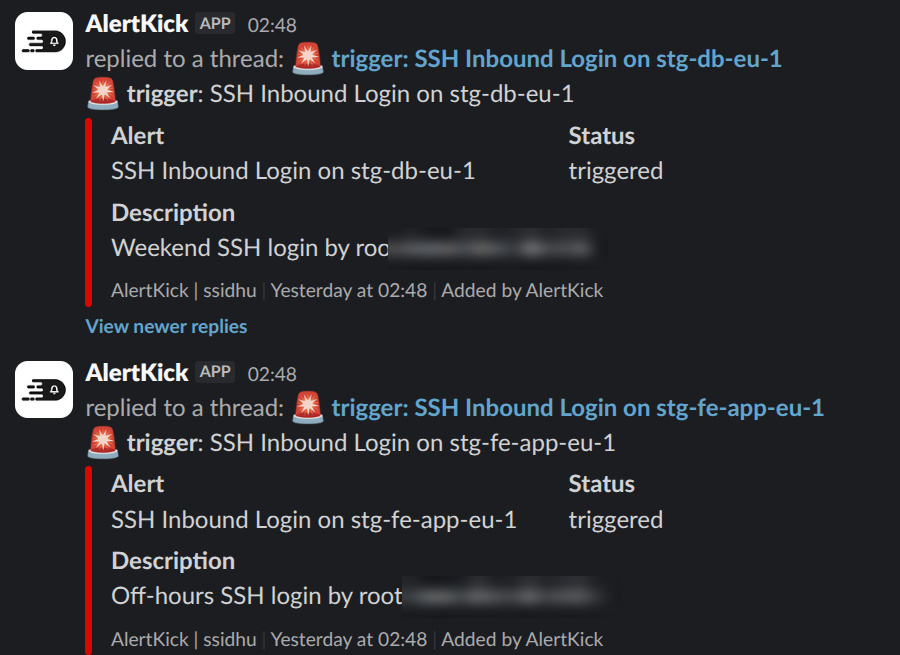
# infra-alerts
Slack messages from AlertKick in an infra-alerts channel: inbound SSH login alerts with status and description
a thread per alert in the channel your team already watches
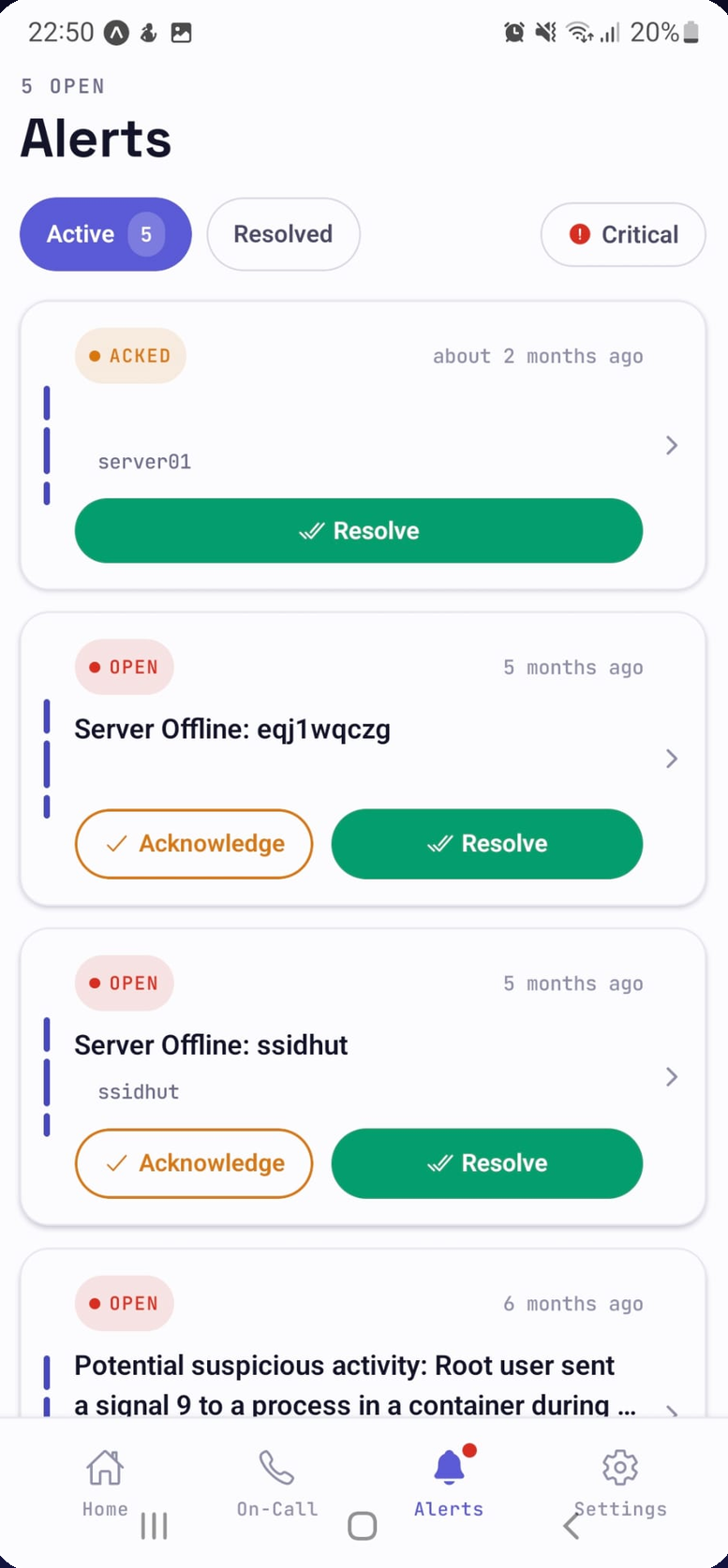
AlertKick mobile app alerts screen: open and acknowledged alerts with acknowledge and resolve buttons
the mobile app: acknowledge or resolve from bed, and the ladder stops

fewer pages, not more

A rota only works if the pages are worth waking up for.

Alerts are grouped and deduplicated before anyone is paged, and AI reads each one in context to decide whether it is worth an interruption. Three web servers spiking behind one load balancer is one page, not three.

the same agent, one layer down

It can also be the thing that raises the alert.

Install the agent and AlertKick stops being only an on-call tool. It watches your servers from inside the kernel with eBPF - intrusions, SSH logins, rootkits, crypto miners, file changes - and feeds the same rosters and escalation policies you just built.

detect

Kernel-level eBPF detection mapped to MITRE ATT&CK, with AI explaining each event in plain English.

watch

Uptime, response times, SSL and domain expiry, cron heartbeats, CPU, memory, disk, and containers.

attribute

Every SSH session, command, and file change tied to who did it - human, pipeline, or AI agent.

See eBPF security monitoring

pick a part, see what it does

Nine products. One agent watching all of it.

On-call is where most teams start. Everything else comes on the same plan, so this is what you get on day one, not a roadmap.

The rota lives here, not in a spreadsheet.

Build a rotation once - daily, weekly, bi-weekly, or custom - and it keeps turning. The schedule is always visible, so nobody has to guess who is on call tonight.

  • Daily, weekly, bi-weekly, or custom rotations
  • Overrides for holidays, sickness, and swaps
  • A separate roster per team or service
  • Timezone-aware handover times
  • Who is on call now, visible to everyone
  • Off-duty means nobody pages you
roster · daily_oncall on call now: Rio

handover Fri 09:00 · Europe/London

pricing

Priced per server. Never per teammate.

Per-seat on-call tools charge you for every engineer you add to the rotation - which is exactly the wrong incentive. AlertKick's bill tracks your infrastructure. On-call, escalation policies, and the alert sources are on every plan, including Free, and there is no per-seat line on any invoice.

free

£0

One roster, one escalation policy, and alerts in from 28+ sources for 2 users. Pages over mobile push, email, Slack, and Telegram. 5 monitors and 5 heartbeats at 5-minute checks, and a public status page. Commercial use allowed.

most teams

professional

£39/mo

Adds SMS and WhatsApp paging, up to 5 users, and unlimited rosters and policies. 5 agent-based hosts with eBPF security included, 10 monitors and 10 heartbeats at 1-minute intervals, 30-day retention.

business

£149/mo

Up to 25 users, 25 hosts, 50 monitors and 50 heartbeats, Kicker the SRE agent, 90-day retention, priority support, plus compliance evidence and reports for PCI DSS and SOX.

Questions teams ask before moving on-call

Do you charge per engineer?
No. Plans are flat and priced by infrastructure: Free, £39 a month for 5 hosts, £149 a month for 25 hosts. Each plan comes with a user allowance (2, 5, and 25) and there is no per-seat charge, so adding someone to the rotation never changes the bill.
What happens if nobody acknowledges?
The escalation policy keeps climbing. Each level has its own wait time and its own channel, so an unacknowledged page moves from the primary on-call to the backup, then to a roster or a manager, then to a catch-all. Acknowledging stops the climb immediately.
Can people swap shifts and take holidays?
Yes. Overrides cover a specific date range without touching the underlying rotation - the schedule snaps back afterwards. The roster is always visible, so everyone can see who is on call now and when their turn comes.
Which channels can page someone?
Mobile push, SMS, WhatsApp, Telegram, Slack, email, and webhooks. You pick the channel per escalation level, so a warning can go to a Slack channel while a critical page hits SMS and mobile push. On Android, critical pushes use a channel that bypasses Do Not Disturb. There are no automated voice calls yet - SMS and WhatsApp are the loudest channels.
Is AlertKick a PagerDuty or Opsgenie replacement?
For the on-call and paging job, yes: rosters, rotations, overrides, escalation policies, per-level channels, and alerts in from the usual monitoring sources, with an importer that brings schedules and policies across from either tool. What you will not find is a voice-call channel, a several-hundred-item integration catalogue, or enterprise incident workflows. The alternatives pages set out the differences plainly.
Can I run it from Claude?
Yes. AlertKick is listed in the Claude connector directory. Connect it once and Claude can create uptime, SSL, DNS, TCP and heartbeat monitors, read alerts, incidents and security events, acknowledge and resolve, and open change windows - 38 tools in total, scoped to your workspace, with every write marked as a write so Claude asks first. Claude Code, Cursor, and any other MCP client work the same way. ChatGPT has a second route: open an AlertKick page in its desktop browser and the page hands it the same tools over WebMCP, with nothing to connect.
Can I keep the monitoring I already have?
Yes. AlertKick accepts alerts from Prometheus Alertmanager, Grafana, Datadog, CloudWatch, Zabbix, Nagios, Icinga2, and a generic webhook. Point your existing alerts at it and use it purely as the on-call and escalation layer.
Does off-duty actually mean off?
Yes. Only the person the roster says is on call for that window gets paged, plus whoever the escalation policy names above them. There is no all-hands channel ping at 3 AM.
Put your rota somewhere it can page people.

Build a roster, attach an escalation policy, and fire a test alert at yourself. Ten minutes, no sales call, no per-seat charge. Moving from PagerDuty or Opsgenie? The importer brings your schedules and policies across.

Start free

free plan · no card · commercial use allowed