Heartbeat monitoring
Monitor cron jobs, backups, and scheduled work by having them ping a URL on success - and get paged when the ping stops arriving. Setup takes one line of shell.
Updated
Uptime monitors watch things that answer requests. Heartbeats watch the opposite: scheduled work that is supposed to do something and go quiet - the nightly backup, the certificate renewal cron, the queue worker, the report generator. These fail silently by construction, and a heartbeat is the only monitor shape that can see it happen.
The mechanism: your job pings a unique URL when it succeeds. AlertKick expects that ping on the schedule you declare. When a ping goes missing past the grace period, the escalation policy fires.
Create a heartbeat
Monitoring, then Heartbeats, then Add Heartbeat. Three fields matter:
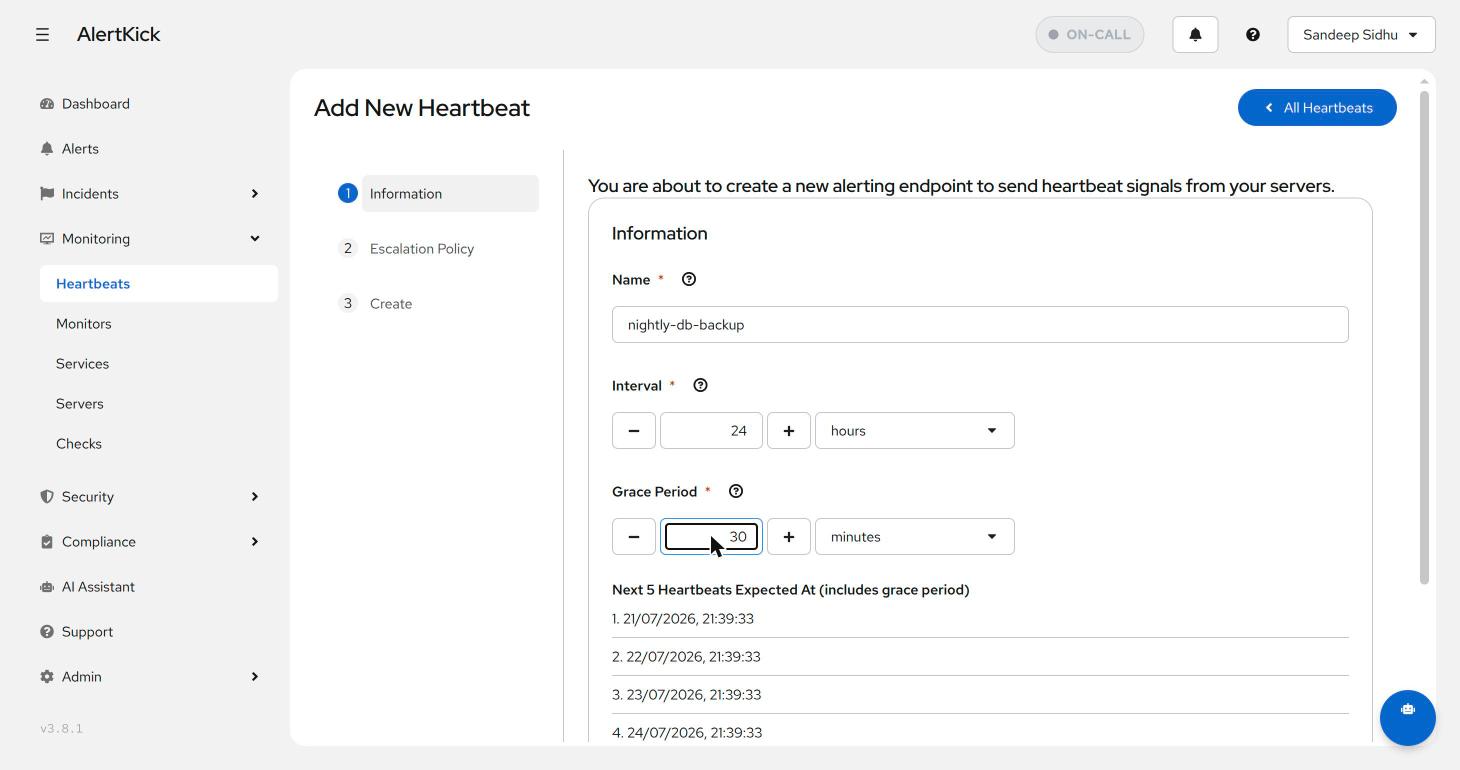
- Interval - how often the job runs. For a nightly backup, 24 hours.
- Grace period - how late a ping may be before it counts as missed. This absorbs normal runtime variance: a backup that takes 5 to 20 minutes wants a 30 minute grace, not zero. Too tight pages you about slow-but-fine runs; too loose delays the real alert by the same amount.
- Escalation policy - step two of the wizard binds the heartbeat to a policy, same as any monitor (escalation policies).
The wizard previews the next five expected ping times (including grace) so you can confirm the schedule matches the crontab before saving.
Add the ping to the job
One line, after the work succeeds:
#!/bin/bash
pg_dump mydb | gzip > /backups/db-$(date +%F).sql.gz \
  && curl -fsS https://hb.alertkick.com/ping/YOUR-HEARTBEAT-ID > /dev/null
The && is the point: the ping only fires if the backup command exited
zero. Any failure - disk full, credentials rotated, host down, cron itself
disabled - means no ping, and the absence is what gets alerted on. That
inversion is why heartbeats catch failure modes that log-watching misses:
nothing has to run for the alert to fire.
For jobs where the exit code lies (some tools exit 0 after partial failure), verify the output before pinging - check the dump file is non-trivial in size, or that the row count landed where you expect. The heartbeat monitoring post covers those patterns in depth.
Reading the list
Each heartbeat shows its status, interval plus grace, the bound escalation policy, and when the last ping arrived:
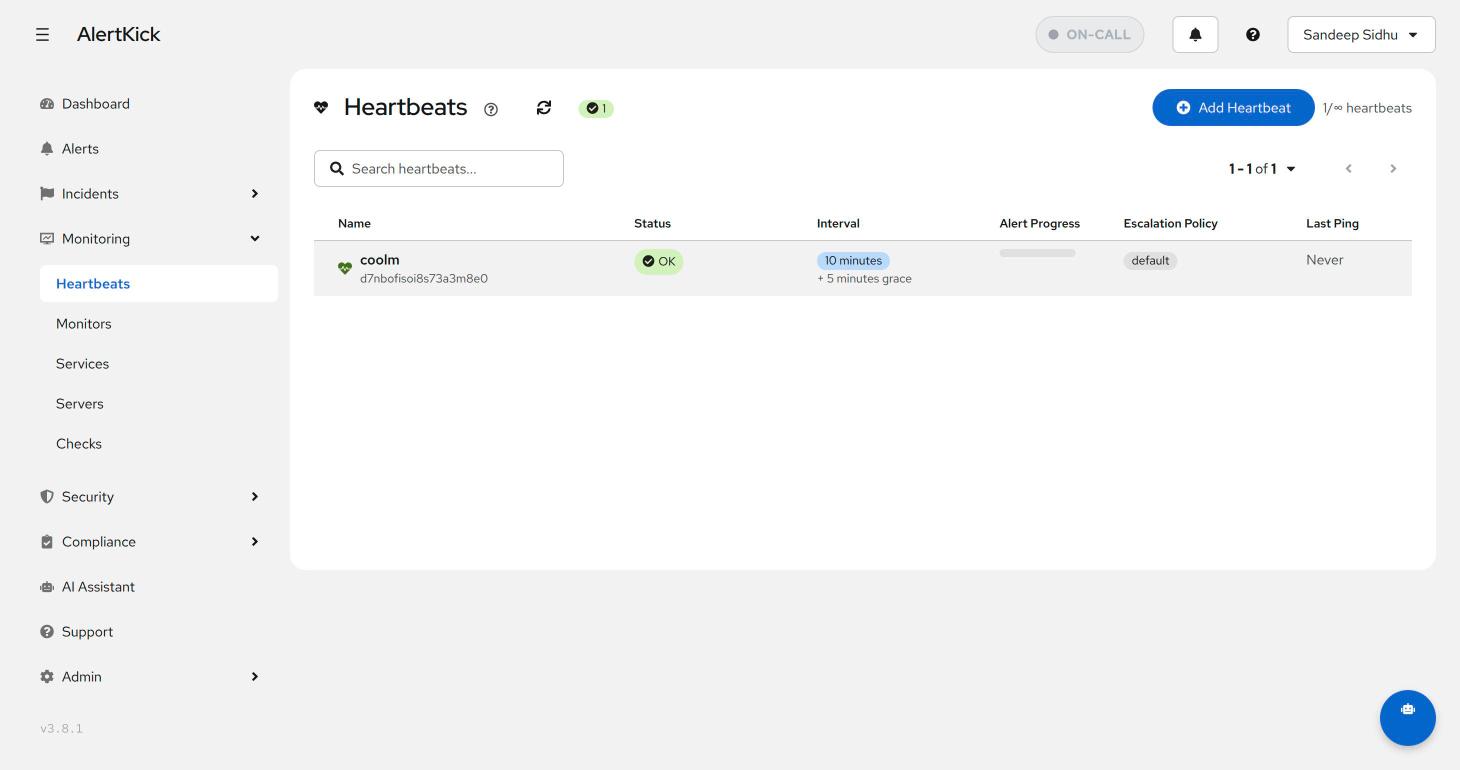
“Last ping: Never” on a heartbeat you created a while ago is itself the finding - the job either never ran or the ping line never shipped. Trigger the job by hand once after wiring it up, and watch the ping land, before you trust the silence.
What to put heartbeats on
Anything scheduled whose failure you’d otherwise discover at the worst moment: database backups, offsite sync, certificate renewal, log rotation, billing runs, queue consumers (ping every N minutes from the worker loop), CI nightly builds, and ML training jobs that run for hours unattended.
Next steps
- Give jobs with different blast radii different policies - a missed backup can wake someone; a missed sitemap rebuild can wait for morning.
- Pair with uptime monitors for the request-serving half of the estate.
Try it on your own infrastructure
Everything in this guide works on the free plan or the 30-day money-back paid tiers - uptime monitors, heartbeats, escalations and on-call, plus the agent for metrics and eBPF security. Setup takes minutes, not sprints.