How to get notified when someone logs into your server over SSH
Three DIY ways to get an SSH login notification on email, Slack, or Telegram - PAM hooks, auth.log watchers, and their failure modes - plus what it takes to make login alerting something you can actually trust.

Sandeep Sidhu · Founder, AlertKick

The fastest way to get notified when someone logs into your server over SSH is a PAM hook: one pam_exec line in /etc/pam.d/sshd that runs a script on session open, posting to Telegram, Slack, or email. It takes ten minutes and the complete script is below. The alternatives are watching the auth log with a small daemon, or an agent that captures logins at the kernel with eBPF and reports off-host.
An SSH login is the single most useful security signal a Linux server produces. Almost every server compromise - stolen keys, leaked passwords, brute force that finally landed - eventually turns into a session on your box. If you get told the moment a session opens, you find out about an intrusion in seconds instead of during next month’s bill review. The DIY version has real failure modes, though. Both halves are below.
The classic DIY: a PAM hook
PAM (Pluggable Authentication Modules) runs a stack of modules on every SSH session. pam_exec runs a script at session open. That is the hook you want.
Create the alert script:
#!/bin/bash
# /usr/local/bin/ssh-login-alert.sh
# Called by pam_exec on session open. PAM exposes context as env vars.
[ "$PAM_TYPE" = "open_session" ] || exit 0

MSG="SSH login: ${PAM_USER}@$(hostname) from ${PAM_RHOST} at $(date -Is)"

# Telegram
curl -fsS "https://api.telegram.org/bot<YOUR_BOT_TOKEN>/sendMessage" \
  -d chat_id="<YOUR_CHAT_ID>" -d text="$MSG" > /dev/null

# Or Slack (incoming webhook)
# curl -fsS -X POST -H 'Content-type: application/json' \
#   --data "{\"text\":\"$MSG\"}" "https://hooks.slack.com/services/XXX/YYY/ZZZ" > /dev/null

exit 0
Make it executable, then add one line to /etc/pam.d/sshd:
session optional pam_exec.so seteuid /usr/local/bin/ssh-login-alert.sh
Two details matter here. Use optional, not required. If the script breaks, required locks every user out of SSH, including you. Always exit 0. A non-zero exit from a session module is a bad day.
Every SSH session - password or key - now pings your phone.
The other DIY routes, briefly
Watch the auth log. A small daemon (or a journalctl -f loop) tails sshd’s log lines and fires a webhook on Accepted password / Accepted publickey. Works, survives PAM misconfiguration, but now you’re parsing log formats that differ across distros and versions, and you’ve written a tiny daemon you have to keep alive - which means monitoring your monitoring.
fail2ban and friends. Worth having, but solving a different problem: they ban IPs that fail repeatedly. The login you most need to hear about is the one that succeeded. A brute-force banner is not a login detector.
Where the DIY version quietly falls short
Run the PAM hook for a month and you’ll meet its limits:
- It reports to the machine that’s been compromised. The alert fires from the same host the attacker just gained a session on. An attacker with root deletes one line from
/etc/pam.d/sshd- or just your script - and the alerts stop. Silence looks exactly like safety. - No context. “root from 203.0.113.7” - is that IP a known-bad address on a threat feed? A hosting provider in a country nobody on the team works from? The 400th failed-then-successful attempt today? The one-line alert can’t say; you’re doing the investigation by hand, at 2 AM, on your phone.
- Noise scales with your fleet. Your own deploy scripts, cron over SSH, and colleagues log in constantly. With one server the pings are charming; with ten servers they’re a muted channel - and a muted channel is the same as no alerting.
- No session story. A login event tells you someone arrived. It doesn’t tell you what they ran, what they touched, or whether a shell appeared somewhere a shell shouldn’t be.
- It’s per-host config. Every new server needs the script, the PAM line, the token. The server you forgot is - by law of nature - the one that gets popped.
A PAM hook on a personal VPS is genuinely worth ten minutes. It means the DIY version is a smoke detector with a battery you have to keep checking.
What trustworthy login alerting looks like
DIY detection and reporting live on the box being attacked, with no context and no memory. Trustworthy alerting fixes that with:
- Kernel-level capture, streamed off-host immediately. The AlertKick agent sees sessions via eBPF at the kernel and ships events to the platform as they happen. Deleting a PAM line doesn’t blind it, and an attacker can’t un-send what already left the box.
- Context attached before it reaches you. Source IP checked against live threat feeds, the login correlated with what happened next (new listening port, odd child processes, file changes), and AI triage writing the plain-English one-liner so you can judge it from your phone.
- Rules instead of raw pings. Alert on root logins always, on unknown-source logins out of business hours, stay quiet for the deploy user from CI’s IP. The channel stays loud enough to trust and quiet enough to keep unmuted.
- Zero per-host wiring. Install the agent and login detection is on. The forgotten-server problem disappears because there’s nothing to remember per server.
What this looks like in AlertKick
The login, on your phone and in Slack
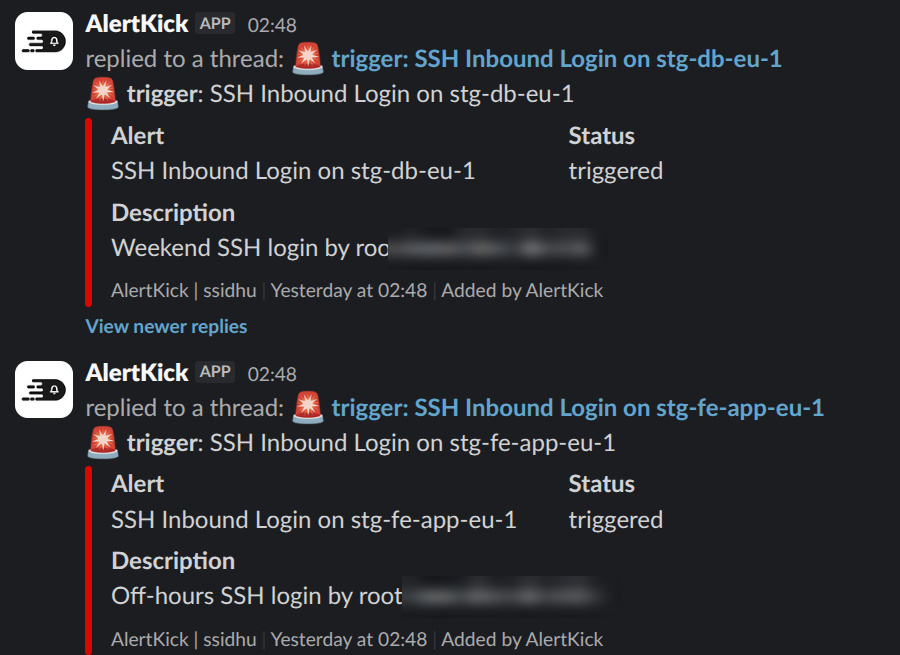
A rule match opens one alert per server and rule, the escalation policy runs, and the notification goes out on whatever that policy uses: mobile push, Slack, SMS, WhatsApp, Telegram, email. AI triage writes the alert text before it is sent, so the message says why the login looked odd (outside business hours, unknown source, no deployment going on) rather than “root from 203.0.113.7”. These two came from one night on our own staging fleet:
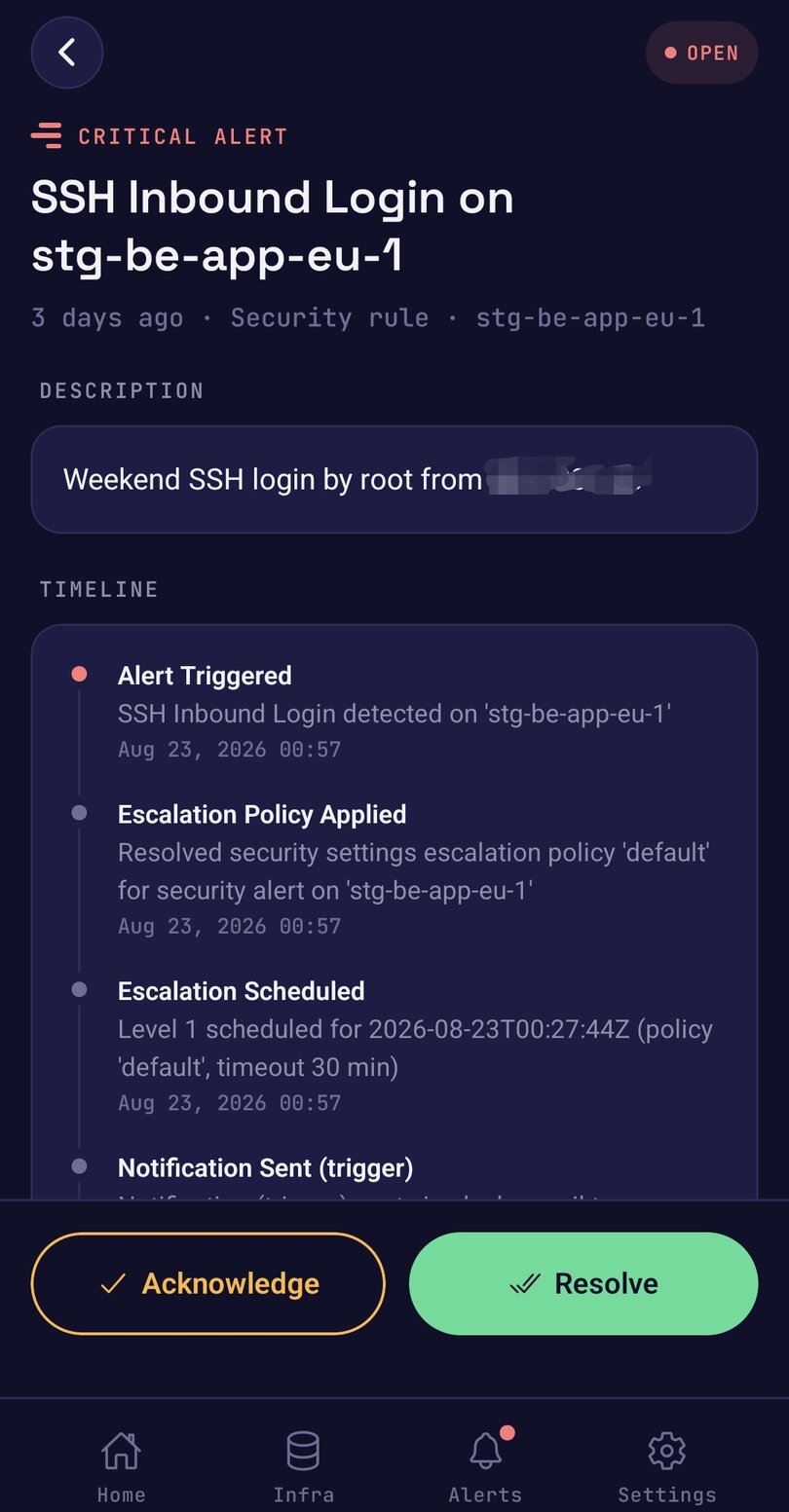
The same alert lands as a push in the mobile app, with the escalation timeline and Acknowledge and Resolve on the card. Acknowledging from the phone stops the escalation ladder. If nobody acknowledges, the policy pages the next person.
Rules that know your working hours and your bastion
The Rules page under Security ships the SSH policies as separate toggles: SSH Login During Off-Hours (critical), SSH Login from Unknown Source IP (critical), Weekend System Access, and SSH Login Audit, an info-level rule that fires on every session so the record is complete and never pages anyone. Business hours are set once on the Alerting tab of that page (timezone, start and end hour, workdays), and the allowed source IPs list on the Lists tab holds your bastions, office ranges, and home addresses. A login from an address that is not on the list fires the unknown-source rule at critical. Leave the list empty and the rule stays quiet, with sessions marked unverified, so “checked and trusted” and “never checked” look different in the UI.
That is the fix for the muted channel. The deploy user from CI’s IP at 14:00 makes no sound; root from an unknown address at 02:00 is a page. The full rule set is in the SSH login monitoring docs.
Every session, with what it ran
Each server has an SSH Logins tab: one row per session with user, source, a trust chip (trusted, untrusted, unverified), process count, duration, and login time. Optional command capture records the command line of each process in the session, redacted on the host before it leaves. Redaction is best-effort, which is why that toggle is off by default.
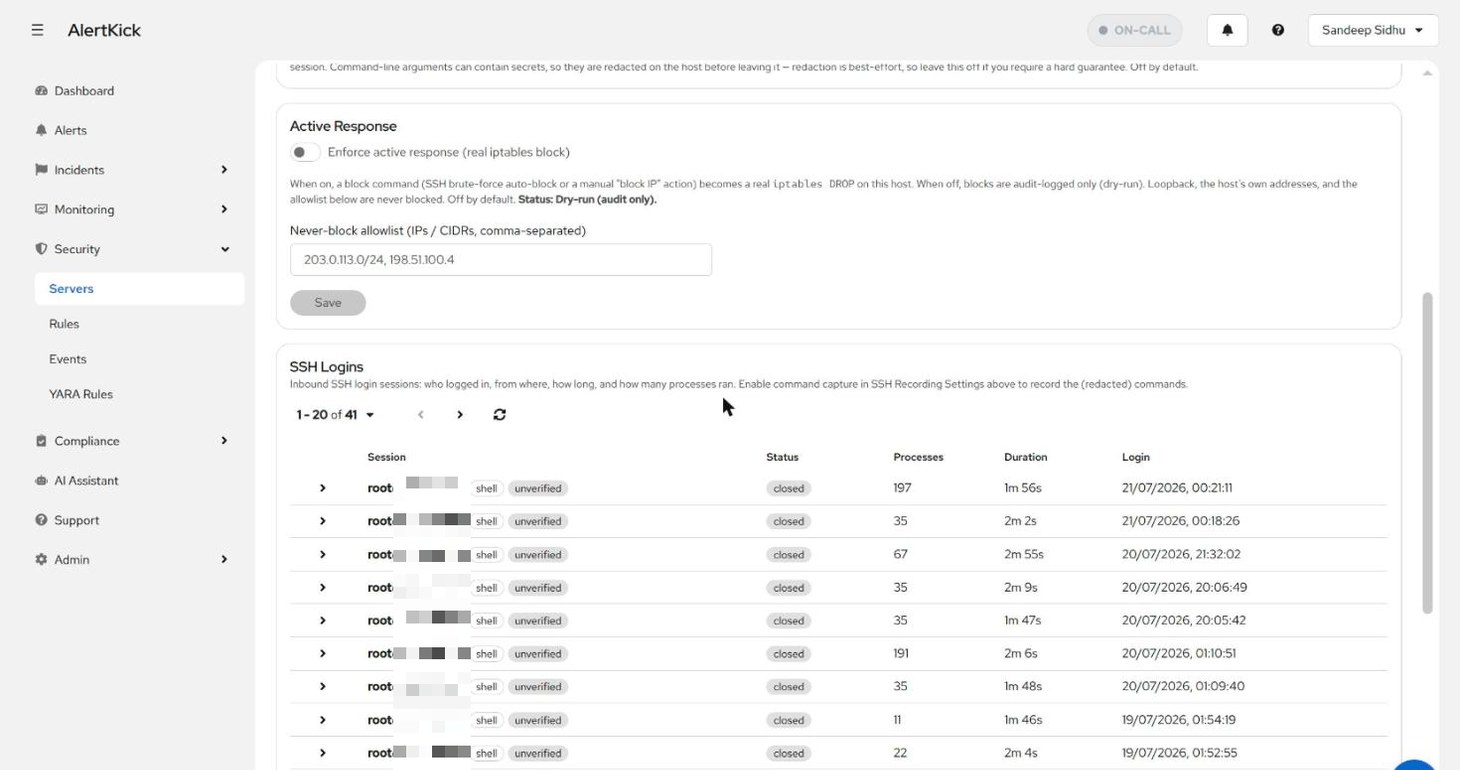
A root session that ran 197 processes in two minutes reads differently from one that ran 11. The PAM hook can only tell you someone arrived.
Lock SSH when nobody should be logging in
Most servers need interactive SSH for a few hours a month. Every other hour of an open port 22 is attack surface, so AlertKick can lock it. SSH lockdown is per host, on the server’s Maintenance tab: turn it on and the agent denies new SSH logins outside the windows you define. When you need the box now, pick 15 min, 30 min, 1 hour, 4 hours, or a custom number of minutes and click Unlock. The host relocks itself when the timer runs out, so nobody has to remember to close the door.
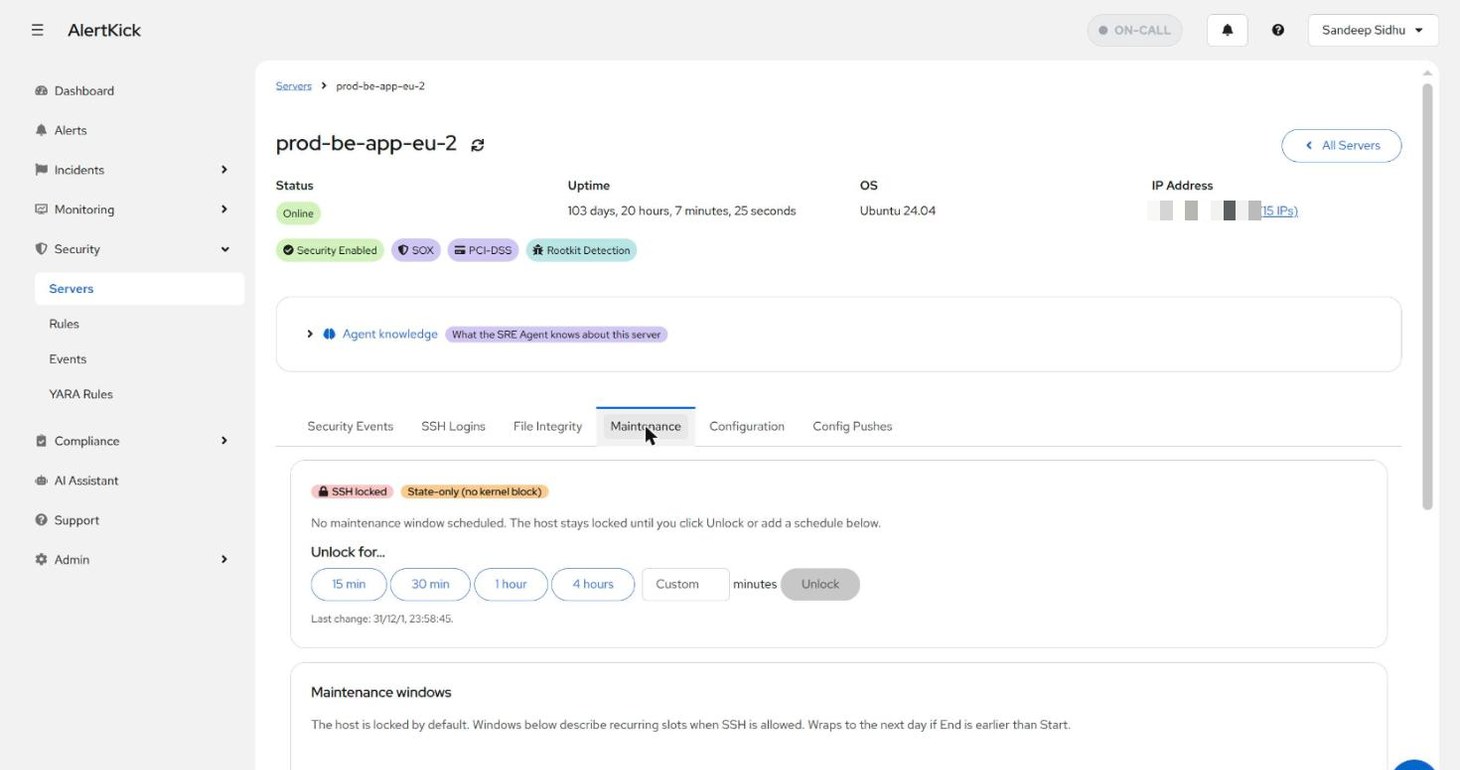
For planned access, recurring maintenance windows (Sundays 02:00-06:00, say) open the host on a schedule, and a permanent bypass allowlist of IPs or CIDRs lets your bastion and CI runner in even while it is locked. Add the bastion before you lock down.
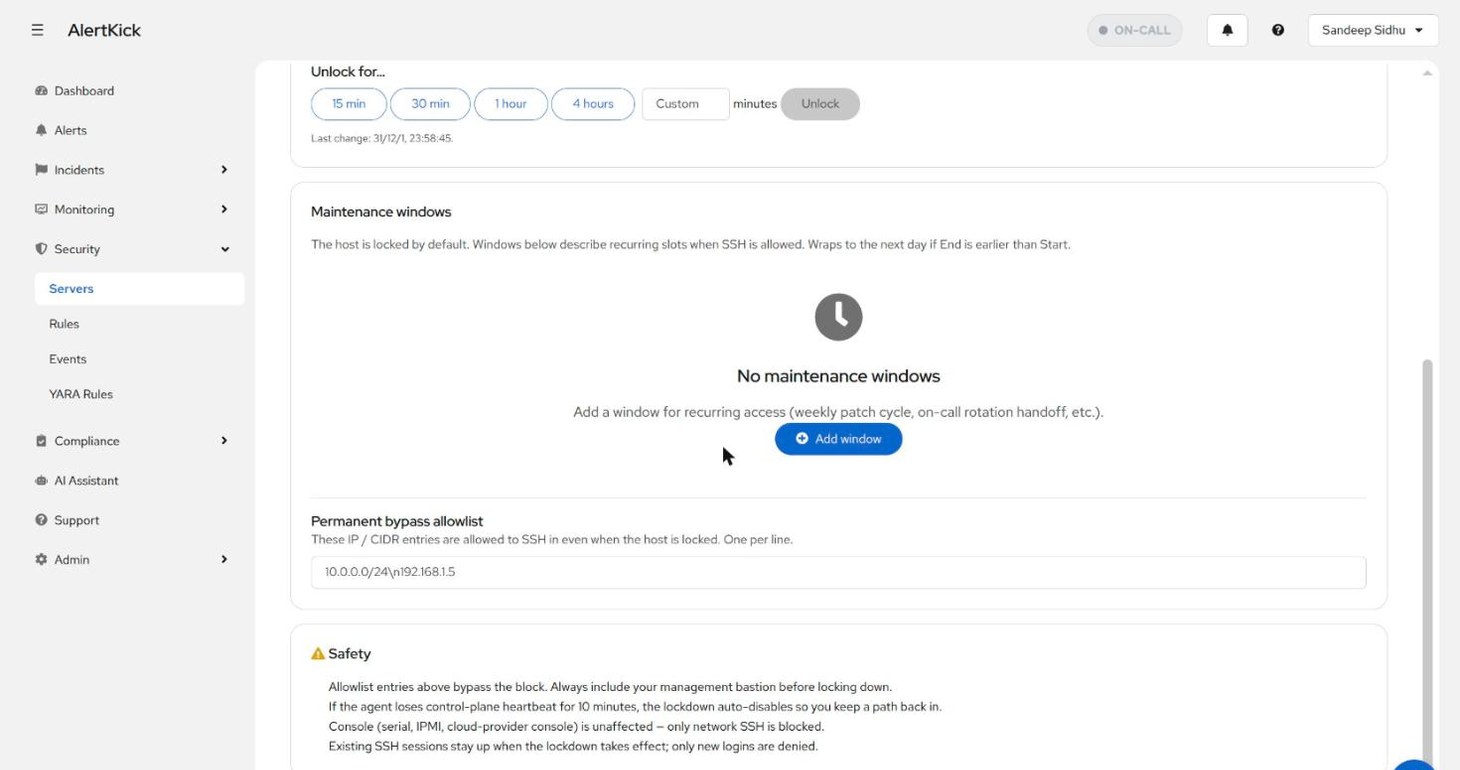
A remote lockout has to be paranoid about its own failure modes. If the agent loses control-plane heartbeat for 10 minutes the lockdown auto-disables, so a dead network path degrades to “SSH open”, never to “locked forever”. Only network SSH is blocked; serial, IPMI, and cloud consoles keep working. Existing sessions stay up when the lock takes effect; only new logins are denied. Logins while the host is open still get session records and trust verdicts, so the time it spent open is on the record afterwards.
SSH login detection is included in eBPF security on every AlertKick host - along with the rest of the detections (miners, reverse shells, new listening ports, file integrity). Start free, install the agent on one test host, SSH in, and watch your own login arrive - explained - before you’ve closed the terminal.
Frequently asked questions
- How do you get notified when someone logs into your server over SSH?
- The fastest way is a PAM hook: add one pam_exec line to /etc/pam.d/sshd that runs a script on session open, and have the script post to Telegram, Slack, or email using the PAM_USER, PAM_RHOST, and PAM_TYPE environment variables. It takes about ten minutes. The alternatives are a small daemon watching the auth log for Accepted lines, or an agent that captures logins at the kernel with eBPF and reports off-host.
- How do you set up a PAM hook for SSH login alerts?
- Create an executable script such as /usr/local/bin/ssh-login-alert.sh that exits 0 unless PAM_TYPE is open_session, builds a message from PAM_USER, the hostname, and PAM_RHOST, and curls it to a Telegram bot or a Slack incoming webhook. Then add the line 'session optional pam_exec.so seteuid /usr/local/bin/ssh-login-alert.sh' to /etc/pam.d/sshd. Use optional rather than required, and always exit 0, or a broken script can lock every user out of SSH.
- Does fail2ban notify you of SSH logins?
- No. fail2ban bans IPs that fail repeatedly, which is a different problem. The login you most need to hear about is the one that succeeded, and a brute-force banner is not a login detector.
- What are the problems with DIY SSH login alerts?
- The alert fires from the compromised host, so an attacker with root can delete the PAM line or the script and the alerts stop. It has no context about whether the source IP is on a threat feed or is the 400th failed-then-successful attempt today. Noise scales with the fleet until the channel gets muted. It says nothing about what the session did afterwards. And it is per-host configuration, so the forgotten server is the one that gets popped.
- What does trustworthy SSH login alerting look like?
- Kernel-level capture streamed off-host immediately, so deleting a PAM line does not blind it and an attacker cannot un-send what already left the box. Context attached before delivery - the source IP checked against live threat feeds and the login correlated with what happened next, such as new listening ports or odd child processes. Rules instead of raw pings, such as always alerting on root logins and staying quiet for the deploy user from CI's IP. And zero per-host wiring.
- Is an SSH login notification worth setting up on a personal VPS?
- Yes. A PAM hook on a personal VPS is worth ten minutes, because an SSH login is the single most useful security signal a Linux server produces and almost every compromise eventually becomes a session on the box. Just know that the DIY version is a smoke detector with a battery you have to keep checking.