The escalation levels AlertKick ships by default
On-call escalation policies don't need to be complicated. AlertKick ships a small set of sensible defaults - three levels, one rotation, one set of quiet hours. Here's what each level is for and why that's enough.

Sandeep Sidhu · Founder, AlertKick

Every on-call tool comes with a rich escalation engine. You can build five-stage policies with conditional branches, time-of-day overrides, per-service routing trees, and a dozen notification channels. It’s impressive. It’s also mostly unnecessary for a team of fewer than about fifty engineers.
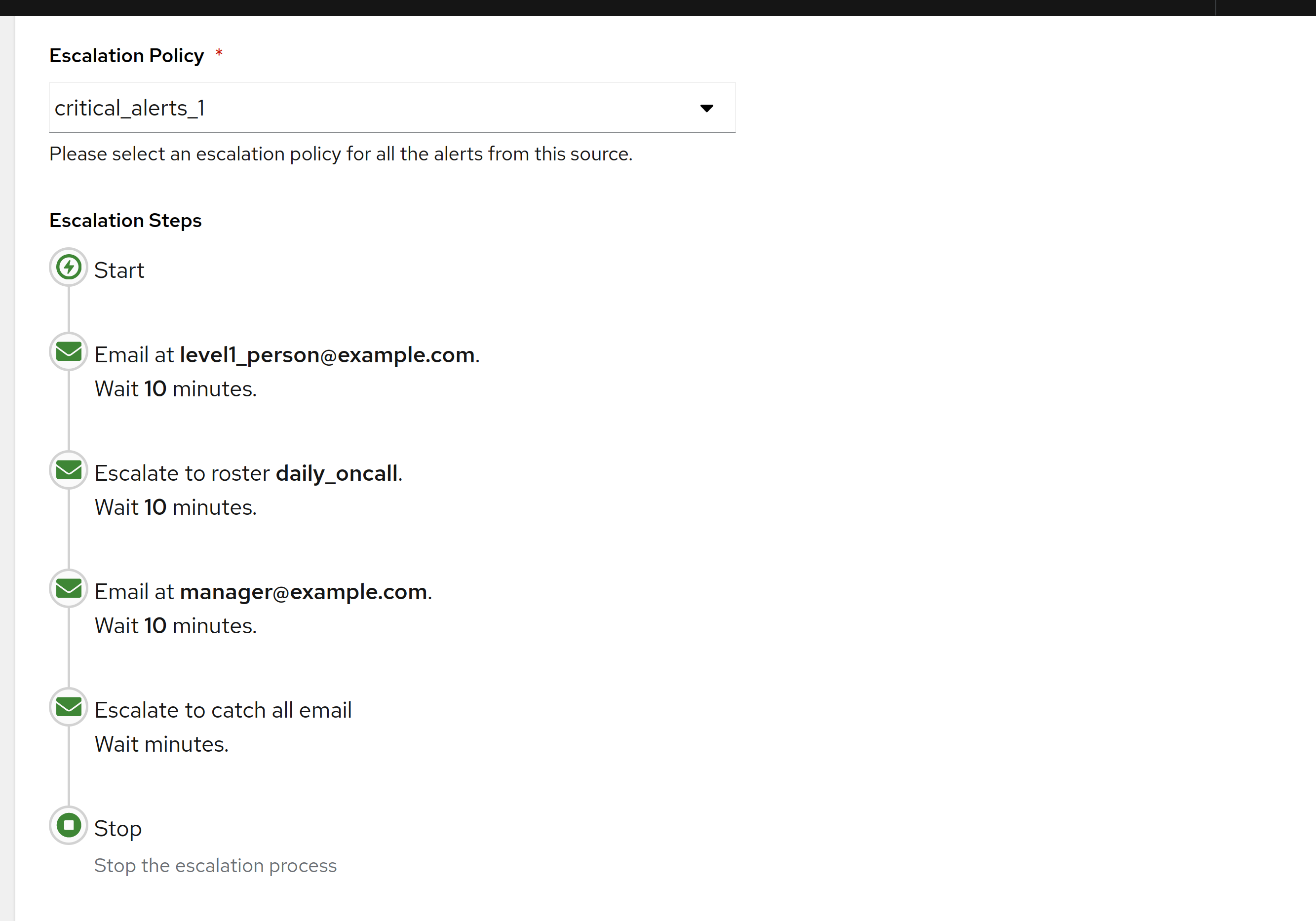
The escalation policy you actually want, for most real-world on-call rotations, is simple. Three steps, one rotation, one set of quiet hours, one fallback. AlertKick ships exactly that as the default, and it covers probably 95% of the cases teams without a dedicated security function will ever hit.
Here’s what the defaults do, and why they’re the defaults.
Level 1 - the primary on-call engineer
This is the person on rotation. They get the first notification through whichever channels they’ve set as “page me now” - typically mobile push with SMS or WhatsApp as the follow-up. The goal is to get them aware of the incident within a minute.
Mobile push is the primary channel. It gets attention quickly, is silenceable during quiet hours by default, and doesn’t require the engineer to have their laptop open. Email is not a paging channel. SMS is a fallback, not primary.
An SMS or WhatsApp message follows if mobile push isn’t acknowledged within a minute. A second channel reaches a phone even when push notifications are being ignored or delayed. That’s the thing that wakes a person at 3 AM when it matters.
Slack is a supplementary channel, not a paging one. The Slack ping goes out at the same time, so the team sees what’s happening, but nobody’s on-call rotation depends on Slack’s notification delivery. It’s not reliable enough for that.
Level 1 expects a human to acknowledge within five minutes. If they don’t, we escalate.
Level 2 - the secondary
The secondary is the backup. Every rotation has one. Their job is to notice the primary didn’t respond and either take the page or make sure the primary does.
At Level 2:
- The primary gets re-notified (louder, again).
- The secondary gets paged through the same channels the primary did.
- The on-call Slack channel gets an “escalated” message so the wider team is aware.
The secondary has another five minutes to acknowledge before we escalate again.
People miss pages. Phones die. They’re on the Tube. They slept through the alarm. The child woke them up two minutes before the page arrived and their phone is in a different room. The secondary exists because the primary is a person.
Level 3 - the team channel
If neither the primary nor the secondary acknowledges within ten minutes, the page broadcasts to the whole on-call channel. Everyone who could potentially take the page now gets notified. The page escalates until somebody picks it up.
At this level we also send a notification to whoever is designated as the escalation manager - typically a senior engineer or team lead - with a clear message that the standard rotation is not responding.
Three levels is the whole policy by default. We don’t add a fourth, a fifth, or a conditional branch. If ten minutes of paging hasn’t reached somebody, the bottleneck isn’t more escalation rules - it’s the rotation itself, and that’s a conversation for Monday morning, not another policy level.
Quiet hours and severity
Escalation interacts with severity - what wakes someone at 3 AM and what waits until morning.
AlertKick ships three severity tiers:
- Critical - the service is down or about to be. Pages the full escalation chain, any time.
- High - something is wrong and needs attention, but can wait for business hours. Pages during working hours. Notifies outside of them without escalation.
- Info - background awareness. Goes to a feed, never pages.
You can override these per check and per host. The default mapping is opinionated. Disk above 85% is High. Disk above 95% is Critical. Systemd unit down for a critical service is Critical. Systemd unit down for a non-critical service is High. OOM kill on a critical host is Critical. Most things are High.
Most incidents should be handled during business hours. The ones that wake someone up are the ones where the product is broken for users. Adjusting that line starts a conversation about what is actually critical in your environment. That is a worthwhile conversation, not a configuration task.
What we don’t ship by default
These are deliberate omissions, not gaps.
- Per-service routing trees. If you have a monolith, you have one team, and you don’t need routing. If you have microservices, services are tagged with their owner and we route to that owner’s rotation - done, no tree required. If your environment is more complex than that, you probably already have a tool more complex than AlertKick, and we’re not the right fit.
Follow-the-sun rotations- this one graduated. Follow the sun is now a first-class schedule type: the rota stays a simple rotation, and off-hours alerts nudge the awake shift on Slack before waking anyone. See Follow the Sun.- Conditional escalation based on alert payload. Tempting. Usually a trap. The alert that needs to escalate “only if X” is an alert that needs a better threshold, not conditional escalation.
- Five-level policies. Three is enough. If three levels don’t catch the page, you have an on-call culture problem, not a tooling problem.
Why this shape is enough
The architecture of a small-team on-call rotation looks like this: somebody is on, somebody is backup, and the team is the ultimate fallback. Everything else is formalising that architecture in a way that survives holidays, sick days, and the occasional dead phone.
Three escalation levels give you exactly that. Primary catches 95% of pages, secondary catches 4%, team catches the last 1%. The 0.01% that escalates past team is the rare case where the manager needs to wake up the team.
Teams routinely build eight-level escalation policies with conditional logic and time-of-day overrides. They end up with the same outcome: one person catches the page, secondary covers when they can’t, team covers when nobody else does. The extra levels were in the config file but never actually fired in production.
Ship the version that reflects what actually happens. That’s what the defaults are.
What you can adjust
The knobs are few and deliberate:
- Who’s in the rotation, and the shape of the rotation (weekly, daily, custom).
- The time between levels - five minutes is the default; you can go shorter for stricter environments or longer for less-critical ones.
- Quiet hours - the window in which non-Critical alerts won’t wake anyone up.
- Severity overrides - per check, per host, if you disagree with one of our classifications.
You cannot build a twenty-branch routing tree. We don’t offer that mode. If you need it, we’re not the right product for your situation, and that’s fine.
Try it
Install the agent, add your team to a rotation, and you have a working on-call setup in about five minutes. The escalation policy above is on automatically. The first page you receive will route the way this post describes.
On-call feature page. Get started.
The related post on heartbeats is going up next. The one after that covers what makes a page genuinely useful and what makes it noise.
Frequently asked questions
- What escalation levels does AlertKick ship by default?
- Three levels, one rotation, one set of quiet hours. Level 1 pages the primary on-call engineer, mainly by mobile push. Level 2, after five minutes without acknowledgement, re-notifies the primary, pages the secondary through the same channels, and posts an escalated message to the on-call Slack channel. Level 3, after ten minutes, broadcasts to the whole on-call channel and notifies the designated escalation manager.
- Which notification channel pages the on-call engineer first?
- Mobile push is the primary paging channel because it gets attention quickly, works without a laptop open, and is silenceable during quiet hours. If the push is not acknowledged within a minute, an SMS or WhatsApp message follows. Slack is a supplementary channel that goes out at the same time so the team can see what is happening, but no rotation depends on it; email is not a paging channel and SMS is a fallback rather than primary.
- How long does AlertKick wait before escalating an alert?
- Five minutes per level by default. The primary has five minutes to acknowledge before the secondary is paged, and the secondary has another five minutes before the whole team channel and escalation manager are notified at the ten-minute mark. The time between levels is adjustable - shorter for stricter environments, longer for less critical ones.
- What severity levels does AlertKick use and which ones page?
- Three tiers. Critical means the thing is down or about to be and pages through the full escalation chain any time, any day. High means something is wrong but can wait for business hours - it pages during working hours and only notifies, without escalation, outside them. Info goes to a feed and never pages. Defaults include disk above 85 percent as High, disk above 95 percent as Critical, and a systemd unit down for a critical service as Critical, all overridable per check and per host.
- Does AlertKick support per-service routing trees or conditional escalation?
- No, deliberately. With a monolith there is one team and no routing needed; with microservices, each service is tagged with its owner and alerts route to that owner's rotation without a tree. Conditional escalation based on alert payload is not shipped because an alert that should escalate only if X usually needs a better threshold, and five-level policies are not offered because three levels are enough. Follow the Sun is available as a first-class schedule type.
- What can I configure in AlertKick's escalation policy?
- The knobs are few: who is in the rotation and its shape (weekly, daily, or custom), the time between levels, the quiet-hours window in which non-Critical alerts will not wake anyone, and severity overrides per check and per host. What you cannot build is a twenty-branch routing tree. Installing the agent and adding your team to a rotation gives a working on-call setup in about five minutes with the default policy already active.